> For the complete documentation index, see [llms.txt](https://docs.scepman.com/llms.txt). Markdown versions of documentation pages are available by appending `.md` to page URLs; this page is available as [Markdown](https://docs.scepman.com/pt/implementacao-do-scepman/deployment-options/marketplace-deployment.md).
# Implementação no marketplace
Implementação no Microsoft Marketplace
* Para implantar o SCEPman a partir do Microsoft Marketplace, visite este [**link**](https://marketplace.microsoft.com/en-us/marketplace/apps/glueckkanja-gabag.scepman?tab=Overview).
* Clique **Obter agora** e depois **Continuar**. Você será redirecionado para o item do marketplace no Azure Portal.
* Clique **Criar**.
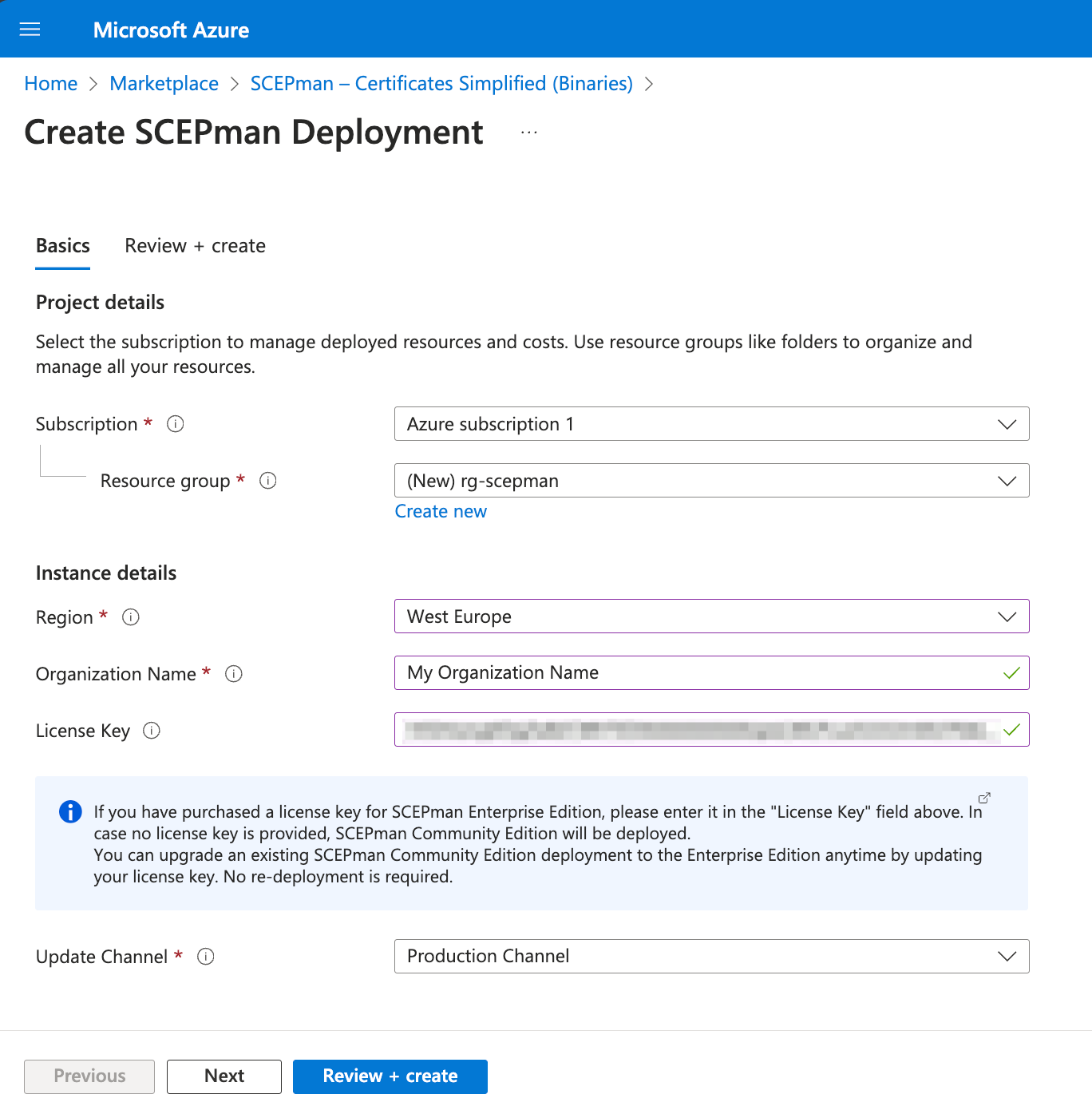
* Agora, siga estes passos para implantar o SCEPman no seu Azure Tenant:
{% hint style="info" %}
Se você tiver uma chave de licença, pode colá-la no campo **Chave de licença**. Deixe-o vazio para usar a edição Community gratuita do SCEPman.
{% endhint %}
{% hint style="warning" %}
Para maximizar a compatibilidade, para o **Nome da organização** recomendamos omitir
* caracteres especiais específicos do idioma (por exemplo, ö, ø, é, ...)
* um espaço inicial (espaços entre palavras podem ser usados)
* aspas
{% endhint %}
1. Selecione um **grupo de recursos** existente ou crie um novo (os recursos do SCEPman serão implantados neste grupo)
2. Defina a **região** de acordo com a localização do seu datacenter preferida. Ela **deve** corresponder à região do grupo de recursos - caso você tenha selecionado um existente. Caso contrário, ela será atribuída ao grupo de recursos.
3. Defina um **Nome da organização**. Este campo é **importante** pois a organização fornecida aqui se manifestará no campo O= da Root CA que será criada posteriormente.
4. Selecione seu **Canal de atualização**. Por padrão, a [abordagem Evergreen](/pt/configuracao-do-azure/update-strategy.md#evergreen-approach) está configurada como [estratégia de atualização](/pt/configuracao-do-azure/update-strategy.md). Este parâmetro determina de qual [canal](/pt/configuracao-do-scepman/application-artifacts.md) os binários do SCEPman serão carregados. Para ambientes de produção, recomendamos usar o **Canal de produção** (padrão).
5. Clique **Revisar + Criar**.
6. Clique **Criar**.
Parabéns! A implantação do SCEPman foi concluída. Por favor, continue com a [próxima etapa](/pt/implementacao-do-scepman/deployment-guides/community-guide.md#step-2-perform-post-deployment-steps-permission-assignments) de [Guia Padrão](/pt/implementacao-do-scepman/deployment-guides/community-guide.md) para concluir a instalação do SCEPman.
---
# Agent Instructions
This documentation is published with GitBook. GitBook is the documentation platform designed so that both humans and AI agents can read, navigate, and reason over technical content effectively. Learn more at gitbook.com.
## Querying This Documentation
If you need additional information that is not directly available in this page, you can query the documentation by asking a question.
Perform an HTTP GET request on the following URL with the `ask` and `goal` query parameters:
```
GET https://docs.scepman.com/pt/implementacao-do-scepman/deployment-options/marketplace-deployment.md?ask=&goal=
```
`ask` is the immediate question: it should be specific, self-contained, and written in natural language.
`goal` is what the user is ultimately trying to achieve, the reason they need the answer. Sharing it helps GitBook give you a better, more relevant answer. A goal is most helpful when it describes the outcome the user wants rather than restating the question. For example, with `ask=how do I create an API token`, a goal like `automate deployments from our CI pipeline` lets GitBook tailor the answer to that use case.
The response will contain a direct answer to the question and relevant excerpts and sources from the documentation.
Use this mechanism when the answer is not explicitly present in the current page, you need clarification or additional context, or you want to retrieve related documentation sections.