> For the complete documentation index, see [llms.txt](https://docs.scepman.com/llms.txt). Markdown versions of documentation pages are available by appending `.md` to page URLs; this page is available as [Markdown](https://docs.scepman.com/pt/gestao-de-certificados/manage-certificates/enabling-crl.md).

# Ativação de CRL

{% hint style="danger" %}
Você precisa **NÃO** habilitar a CRL para SCEPman. Por padrão, o SCEPman usa OCSP para revogação.
{% endhint %}

O SCEPman baseia-se principalmente no OCSP para verificar o status de revogação de certificados, pois o OCSP permite revogação em tempo real, tornando-o o protocolo ideal para ambientes de trabalho dinâmicos. Em contraste, a CRL opera com atualizações agendadas, limitando sua eficácia em cenários sensíveis ao tempo.

No entanto, a CRL continua sendo útil para sistemas legados e aplicações ou como alternativa quando o OCSP não está disponível.

{% hint style="warning" %}
A CRL não conterá certificados que tenham sido revogados automaticamente, apenas certificados que tenham sido revogados explicitamente no Certificate Master
{% endhint %}

## Guia

{% stepper %}
{% step %}

### Navegue até as suas Variáveis de Ambiente

Azure > Serviços de Aplicativos > SCEPman App Service (não Certificate Master) > Configurações > Variáveis de Ambiente

<figure><img src="/files/449a85ff32a4961f51db4877b770493fb98e312f" alt=""><figcaption></figcaption></figure>
{% endstep %}

{% step %}

### Adicionar Variáveis de Ambiente

Observe que os Planos de Serviço de Aplicativo Linux usam um duplo sublinhado (\_\_) em vez de dois-pontos (:). Por exemplo: AppConfig\_\_CRL\_\_RequestToken

<table><thead><tr><th width="247">Definição</th><th width="291">Descrição</th><th>Valor</th></tr></thead><tbody><tr><td><a href="/pages/6d84359f1152197f045aca6e3fe4d590f9563a98#appconfig-crl-requesttoken">AppConfig:CRL:RequestToken</a></td><td><p>Define a URL da CRL. A CRL está disponível nos formatos DER e PEM</p><p><br><strong>DER</strong>: https://<em>yourscepman</em>.azurewebsites.net/crl/<strong>{RequestToken}</strong></p><p><strong>PEM:</strong> https://yourscepman.azurewebsites.net/crl/pem/<strong>{RequestToken}</strong><br><br>Exemplo: https://<em>yourscepman</em>.azurewebsites.net/crl/12345678</p></td><td>24 caracteres <em>cadeia de caracteres</em></td></tr><tr><td><a href="/pages/6d84359f1152197f045aca6e3fe4d590f9563a98#appconfig-crl-source">AppConfig:CRL:Source</a></td><td>Conecta a CRL à sua Storage Account do Azure</td><td>Armazenamento</td></tr><tr><td><a href="/pages/6d84359f1152197f045aca6e3fe4d590f9563a98#appconfig-crl-addcdp">AppConfig:CRL:AddCdp</a></td><td>Adiciona um ponto de distribuição de CRL aos certificados emitidos</td><td>true</td></tr><tr><td><a href="/pages/6d84359f1152197f045aca6e3fe4d590f9563a98#appconfig-crl-validitydays">AppConfig:CRL:ValidityDays</a></td><td>O número de dias que uma CRL emitida é válida</td><td><em>Ponto flutuante</em><br>Exemplo <em>0.1</em> dias = 2,4 horas</td></tr></tbody></table>

<figure><img src="/files/ddc16628c8e0f7e08d0a030bbf028a5037790670" alt=""><figcaption></figcaption></figure>
{% endstep %}

{% step %}

### Aplicar Variáveis de Ambiente

Pressione Aplicar depois que as Variáveis de Ambiente forem adicionadas.

<figure><img src="/files/371c26e2692c73cbc7b2143335081a7e8037f4bb" alt=""><figcaption></figcaption></figure>

<figure><img src="/files/a92904392b2b93151f2c4d752210ee9da0d3a02d" alt=""><figcaption></figcaption></figure>
{% endstep %}

{% step %}

### Reinicie o SCEPman App Service

As novas Variáveis de Ambiente são aplicadas depois que o SCEPman App Service é reiniciado

<figure><img src="/files/4d9b55bf3cd5d1e0d577e845225b360e5586b490" alt=""><figcaption></figcaption></figure>
{% endstep %}

{% step %}

### Testar CRL

Navegue até a sua CRL usando o token de solicitação definido anteriormente no formato de https\://*yourscepman*.azurewebsites.net/crl/**{RequestToken}**

<figure><img src="/files/b78ff2783856e6e96ebb706e4ffb25fc5c67258f" alt=""><figcaption></figcaption></figure>

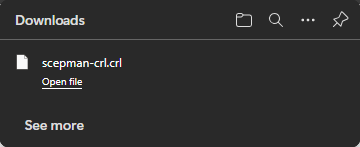
Se estiver configurado corretamente, a sua CRL será baixada:

<figure><img src="/files/8dd906d81b6bb516b6fd1d120377de5813350126" alt=""><figcaption></figcaption></figure>
{% endstep %}

{% step %}

### Use a CRL com Aplicações ou Sistemas

Depois de habilitada, certifique-se de que suas aplicações ou sistemas estejam configurados para verificar a CRL durante a validação de certificados, a fim de evitar o uso de certificados revogados. Alguns sistemas permitem a CRL como opção alternativa caso o OCSP esteja indisponível

Outros sistemas **apenas** permitem CRL para revogação, como CBA para Entra, consulte nosso guia aqui:

{% content-ref url="/pages/102d5c29beb446fbd0eb5e792dc3f14b7e52d8e9" %}
[Autenticação baseada em certificados para Entra ID](/pt/implementacao-do-scepman/deployment-guides/scenarios/certificate-based-authentication-for-entra-id.md)
{% endcontent-ref %}
{% endstep %}
{% endstepper %}


---

# Agent Instructions
This documentation is published with GitBook. GitBook is the documentation platform designed so that both humans and AI agents can read, navigate, and reason over technical content effectively. Learn more at gitbook.com.

## Querying This Documentation
If you need additional information that is not directly available in this page, you can query the documentation dynamically by asking a question.

Perform an HTTP GET request on the current page URL with the `ask` query parameter, and the optional `goal` query parameter:

```
GET https://docs.scepman.com/pt/gestao-de-certificados/manage-certificates/enabling-crl.md?ask=<question>&goal=<endgoal>
```

`ask` is the immediate question: it should be specific, self-contained, and written in natural language.
`goal` is optional and describes the broader end goal you are ultimately trying to accomplish on behalf of the user. GitBook uses it to tailor the answer towards what is most useful for that goal.

The response will contain a direct answer to the question and relevant excerpts and sources from the documentation.

Use this mechanism when the answer is not explicitly present in the current page, you need clarification or additional context, or you want to retrieve related documentation sections.