# CRL の有効化

{% hint style="danger" %}
必要です **忘れずに** SCEPman で CRL を有効にします。既定では、SCEPman は失効確認に OCSP を使用します。
{% endhint %}

SCEPman は主に OCSP に依存して証明書の失効状態を確認します。OCSP はリアルタイムの失効確認を可能にするため、動的な作業環境に最適なプロトコルです。対して、CRL は定期更新で動作するため、時間に敏感なシナリオでは有効性が制限されます。

ただし、CRL はレガシー システムやアプリケーションに対して、または OCSP が利用できない場合のフォールバックとして引き続き有用です。

{% hint style="warning" %}
CRL には自動失効した証明書は含まれず、Certificate Master で明示的に失効された証明書のみが含まれます
{% endhint %}

## ガイド

{% stepper %}
{% step %}

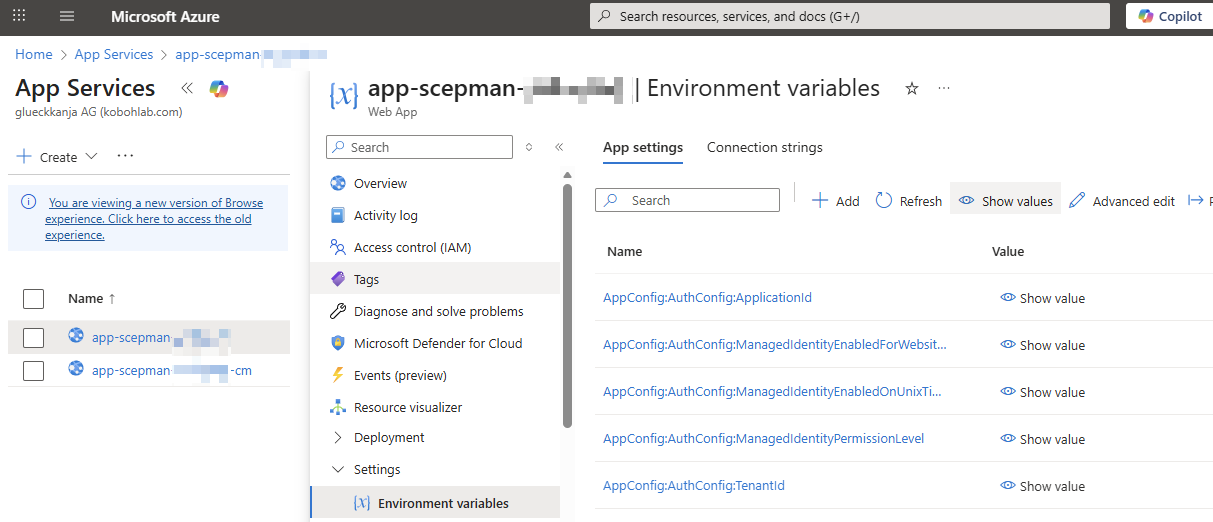
### 環境変数に移動します

Azure > App Services > SCEPman App Service（Certificate Master ではありません）> Settings > Environment Variables

<figure><img src="/files/0b1851565c7d8b9d3a5d34a180b223eccd1d81a5" alt=""><figcaption></figcaption></figure>
{% endstep %}

{% step %}

### 環境変数を追加&#x20;

Linux の App Service Plan では、コロン（:）の代わりに二重アンダースコア（\_\_）を使用する点に注意してください。例: AppConfig\_\_CRL\_\_RequestToken

<table><thead><tr><th width="247">設定</th><th width="291">説明</th><th>値</th></tr></thead><tbody><tr><td><a href="/pages/126d6eeb53f04483f9d2d91cdc682dbc43f89911#appconfig-crl-requesttoken">AppConfig:CRL:RequestToken</a></td><td><p>CRL の URL を定義します。CRL は DER と PEM の両方で利用できます</p><p><br><strong>DER</strong>: https://<em>yourscepman</em>.azurewebsites.net/crl/<strong>{RequestToken}</strong></p><p></p><p><strong>PEM:</strong> https://yourscepman.azurewebsites.net/crl/pem/<strong>{RequestToken}</strong><br><br>例: https://<em>yourscepman</em>.azurewebsites.net/crl/12345678</p></td><td>24 文字の <em>文字列</em></td></tr><tr><td><a href="/pages/126d6eeb53f04483f9d2d91cdc682dbc43f89911#appconfig-crl-source">AppConfig:CRL:Source</a></td><td>CRL を Azure Storage アカウントに接続します</td><td>Storage</td></tr><tr><td><a href="/pages/126d6eeb53f04483f9d2d91cdc682dbc43f89911#appconfig-crl-addcdp">AppConfig:CRL:AddCdp</a></td><td>発行された証明書に CRL 配布ポイントを追加します</td><td>true</td></tr><tr><td><a href="/pages/126d6eeb53f04483f9d2d91cdc682dbc43f89911#appconfig-crl-validitydays">AppConfig:CRL:ValidityDays</a></td><td>発行された CRL の有効日数</td><td><em>浮動小数点</em><br>例 <em>0.1</em> 日 = 2.4 時間</td></tr></tbody></table>

<figure><img src="/files/427ce0c75e672c01d820c647eae4a501bff01a1c" alt=""><figcaption></figcaption></figure>
{% endstep %}

{% step %}

### 環境変数を適用

環境変数を追加した後、\[適用] を押してください。&#x20;

<figure><img src="/files/935ebaf69809e3188c2a673e6e3586d1bfe9ca91" alt=""><figcaption></figcaption></figure>

<figure><img src="/files/e97e63302f32ba5e1278543d3c3abab0118e6908" alt=""><figcaption></figcaption></figure>
{% endstep %}

{% step %}

### SCEPman App Service を再起動

SCEPman App Service を再起動すると、新しい環境変数が適用されます

<figure><img src="/files/c66ac698f3f5f27f2f35dc3ba32a72bcdfc3d996" alt=""><figcaption></figcaption></figure>
{% endstep %}

{% step %}

### CRL をテスト

以前に設定した Request Token を使用して、https\:// の形式で CRL に移動します*yourscepman*.azurewebsites.net/crl/**{RequestToken}**

<figure><img src="/files/362f8ca58c819d2f9afaf6d9b8c7b9e61e103022" alt=""><figcaption></figcaption></figure>

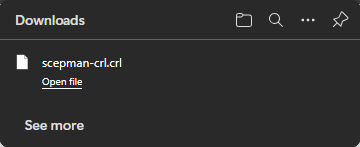
正しく設定されていれば、CRL がダウンロードされます:

<figure><img src="/files/1e467f8e7f24e1ad8210302370962723c982586c" alt=""><figcaption></figcaption></figure>
{% endstep %}

{% step %}

### アプリケーションまたはシステムで CRL を使用する

有効化したら、証明書の検証中に CRL を確認するようアプリケーションまたはシステムが構成されていることを確認し、失効した証明書の使用を防いでください。一部のシステムでは、OCSP が利用できない場合のフォールバック オプションとして CRL を使用できます

他のシステムでは **のみ** Entra 用の CBA など、失効確認に CRL のみを許可します。こちらのガイドをご覧ください: &#x20;

{% content-ref url="/pages/5160bb6b3dc3b90114ab94e6e8378d559848d642" %}
[Entra ID の証明書ベース認証](/ja/scepman-depuroi/deployment-guides/scenarios/certificate-based-authentication-for-entra-id.md)
{% endcontent-ref %}
{% endstep %}
{% endstepper %}


---

# Agent Instructions: Querying This Documentation

If you need additional information that is not directly available in this page, you can query the documentation dynamically by asking a question.

Perform an HTTP GET request on the current page URL with the `ask` query parameter:

```
GET https://docs.scepman.com/ja/zheng-ming-shu-guan-li/manage-certificates/enabling-crl.md?ask=<question>
```

The question should be specific, self-contained, and written in natural language.
The response will contain a direct answer to the question and relevant excerpts and sources from the documentation.

Use this mechanism when the answer is not explicitly present in the current page, you need clarification or additional context, or you want to retrieve related documentation sections.