> For the complete documentation index, see [llms.txt](https://docs.scepman.com/llms.txt). Markdown versions of documentation pages are available by appending `.md` to page URLs; this page is available as [Markdown](https://docs.scepman.com/ja/sono/faqs/key-vault-rbac-migration.md).
# Key Vault RBAC 移行
Microsoft は、Azure Key Vault をすべての新しい Key Vault の既定のアクセス制御モデルとして Azure RBAC へ移行しており、API バージョン **2026‑02‑01**。詳細を読む [こちら](https://learn.microsoft.com/en-us/azure/key-vault/general/access-control-default?tabs=azure-cli).
RBAC は厳密には必須ではなく、 **アクセス ポリシーを使用している既存の Key Vault は、そのまま引き続き動作できます。** 新しい API にアップグレードした後に新しい Key Vault を作成するテナントは、アクセス ポリシーが明示的に構成されていない限り、既定で RBAC が適用されます。
いずれにしても RBAC へ移行することを検討するとよいでしょう。Microsoft Entra ID に整合した、より統一的でスケーラブルな権限モデルを提供し、Microsoft が Key Vault のアクセス ポリシーを廃止した場合にも構成を将来にわたって保護できます。
## 移行ガイド
{% hint style="warning" %}
先にダウンタイムを考慮してください。権限の移行が正常に完了するまで、SCEPman は証明書の発行または検証を行えません。
{% endhint %}
{% stepper %}
{% step %}
### SCEPman Key Vault に移動します
Azure > Key Vaults > に移動します *あなたの SCEPman Key Vault*
{% endstep %}
{% step %}
### 既存のアクセス ポリシーを確認する
へ移動する **アクセス ポリシー** また、SCEPman のアクセス ポリシーを **アプリケーション***.* SCEPman のアクセス ポリシーは、SCEPman App Service(および地理的冗長構成の SCEPman App Service)の名前と同じにする必要があります。
*ユーザー* アクセス ポリシーは SCEPman の機能に影響しないため、移行する必要はありません。継続的なアクセスが必要なユーザーについては、以下の表に基づいてアクセス ポリシーを確認し、Azure ロールへ移行してください:
{% endstep %}
{% step %}
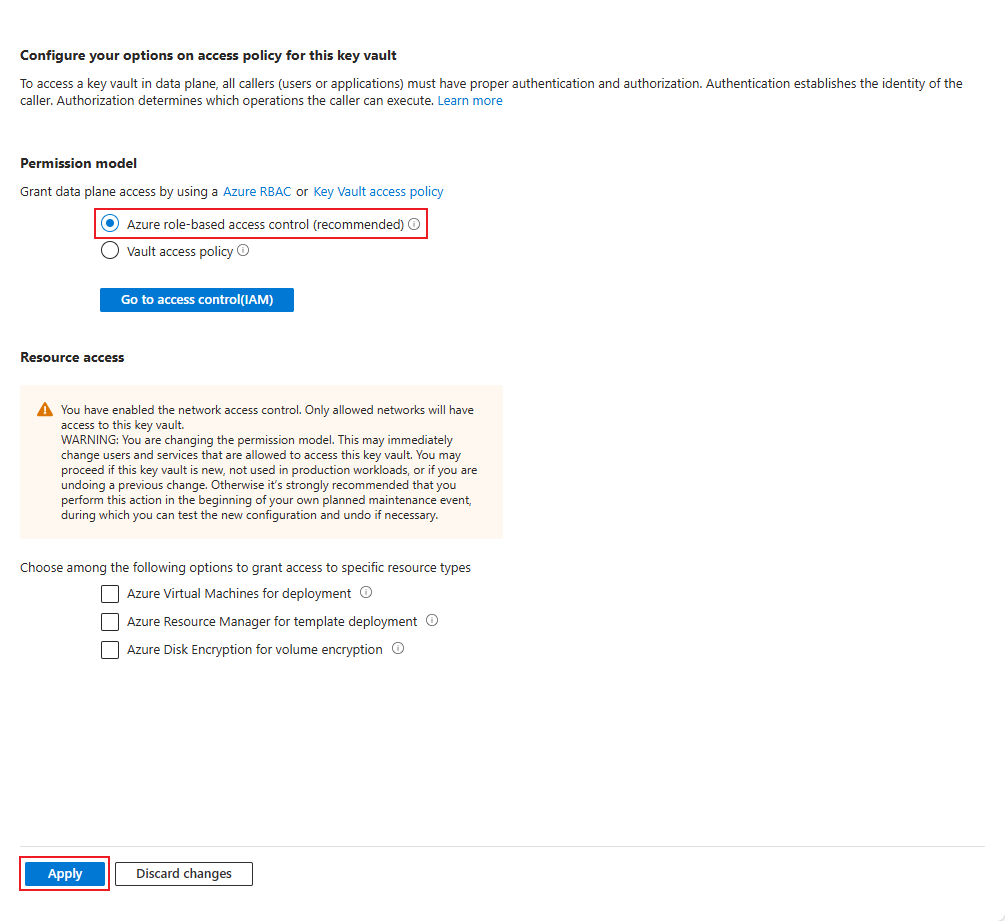
### アクセス許可モデルを変更する
アクセス許可モデルを **Vault アクセス ポリシー** を **Azure のロールベースのアクセス制御**
「 **適用** を押すと、Azure ロールが割り当てられるまで、SCEPman インスタンスと Key Vault の接続が切断されます。以前のアクセス ポリシーも削除されます。
{% endstep %}
{% step %}
### Azure ロールを割り当てる
アクセス制御 (IAM) に移動し、次のロールを **マネージド ID** SCEPman App Service(および地理的冗長構成の SCEPman App Service)の
* Key Vault 証明書オフィサー
* Key Vault 暗号オフィサー
* Key Vault シークレット ユーザー
ロールは 1 つずつ割り当てる必要がありますが、1 つのロールに複数の ID を割り当てることはできます。
Certificate Master のマネージド ID(名前に -cm を含む) **はサポートしていません** Key Vault へのアクセスが必要です。
{% endstep %}
{% step %}
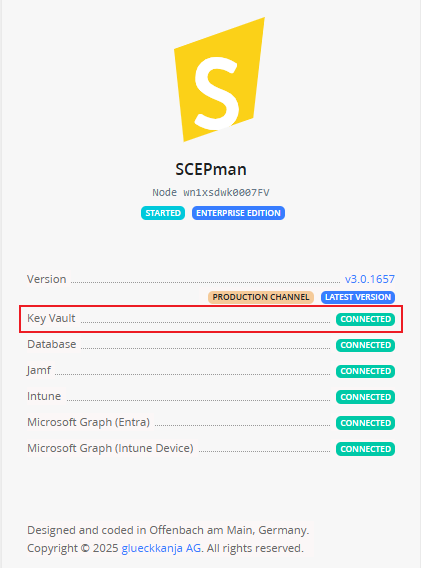
### Key Vault 接続を確認する
SCEPman App Service を再起動し、SCEPman のホームページに移動して、Key Vault が接続されていることを確認してください。
{% endstep %}
{% endstepper %}
---
# Agent Instructions
This documentation is published with GitBook. GitBook is the documentation platform designed so that both humans and AI agents can read, navigate, and reason over technical content effectively. Learn more at gitbook.com.
## Querying This Documentation
If you need additional information that is not directly available in this page, you can query the documentation dynamically by asking a question.
Perform an HTTP GET request on the current page URL with the `ask` query parameter, and the optional `goal` query parameter:
```
GET https://docs.scepman.com/ja/sono/faqs/key-vault-rbac-migration.md?ask=&goal=
```
`ask` is the immediate question: it should be specific, self-contained, and written in natural language.
`goal` is optional and describes the broader end goal you are ultimately trying to accomplish on behalf of the user. GitBook uses it to tailor the answer towards what is most useful for that goal.
The response will contain a direct answer to the question and relevant excerpts and sources from the documentation.
Use this mechanism when the answer is not explicitly present in the current page, you need clarification or additional context, or you want to retrieve related documentation sections.