> For the complete documentation index, see [llms.txt](https://docs.scepman.com/llms.txt). Markdown versions of documentation pages are available by appending `.md` to page URLs; this page is available as [Markdown](https://docs.scepman.com/ja/scepman-gou-cheng/rbac.md).
# 証明書マスター RBAC
{% hint style="warning" %}
SCEPman Enterprise Edition のみ
{% endhint %}
{% hint style="info" %}
SCEPman Certificate Master バージョン 2.5 以降に適用
{% endhint %}
ユーザーが SCEPman Certificate Master にアクセスすると、ロールによって実行できる操作と表示できる証明書が決まります。ロールは Enterprise Application を通じて決定されます *SCEPman-CertMaster* Microsoft Entra ID (Azure AD) 内で。SCEPman をバージョン 2.5 より前にインストールしている場合は、Microsoft Entra Portal でロールを表示するために、SCEPman PS Module から Complete-SCEPmanInstallation CMDlet をもう一度実行する必要があります。利用可能なロールは次のとおりです:
## 利用可能なロール
* **Admin.Full**:このロールのメンバーは、SCEPman Certificate Master で何でも行えます。将来のバージョンの SCEPman Certificate Master に新機能が追加された場合、その機能も利用できます。
* **Manage.All**:このロールのメンバーは、すべての証明書を表示および失効できます。これには、Certificate Master データベース内の証明書と、Intune 経由で登録された証明書の両方が含まれます。
* **Manage.All.Read**:メンバーはすべての証明書を表示できますが、失効はできません。
* **Manage.Intune**:メンバーは、Intune 経由で登録された証明書を表示および失効できます。
* **Manage.Intune.Read**:メンバーは、Intune 経由で登録された証明書を表示できますが、失効はできません。
* **Manage.Storage**:メンバーは、Certificate Master データベース内の証明書を表示および失効できます。
* **Manage.Storage.Read**:メンバーは、Certificate Master データベース内の証明書を表示できますが、失効はできません。
* **Request.All**:メンバーはあらゆる種類の証明書を要求できます。これには、任意の種類の CSR 要求の送信が含まれます。ユーザーが CSR 要求を送信する必要がある場合、このロールが必要です。
* **Request.Client**:要求はクライアント証明書、つまり手動で作成されたデバイス証明書に限定されます。Client Authentication Extended Key Usage (EKU) と、カスタマイズ可能なサブジェクトを持ちます。
* **Request.CodeSigning**:要求は Code Signing 証明書にのみ対応しています。
* **Request.Server**:メンバーはサーバー証明書のみを要求できます。Server Authentication EKU を持ちます。
* **Request.SubCa**:メンバーは Subordinate CA 用の証明書を要求できます。ただし、Extended Key Usage により、これらの CA は Server Authentication 証明書のみを発行できます。これにより、Firewall で使用される TLS インターセプションには利用できますが、他の目的には使用できません。これはセキュリティ機能です。別の目的で Subordinate CA が必要な場合は、CSR を作成して Certificate Master に送信する必要があります。これには、 *Request.All* ロール。
* **Request.User**:メンバーはユーザー証明書のみを要求できます。Client Authentication EKU と、要求者が選択した UPN を持ちます。SCEPman 2.6 以降では、Smart Card Logon EKU も使用できます。このロールを持つユーザーは他のユーザーの証明書を要求できることに注意してください。AD または AAD で Certificate Based Authentication を有効にし、この目的のために SCEPman CA を AD または AAD で信頼済みとして追加している場合、これは他のユーザーになりすますために使用される可能性があります。
{% hint style="info" %}
これは、インストール後の構成中に追加される既定のロールセットです。必要に応じて、より複雑なロールをいくつか追加できます: [CSR とフォームのロール](/ja/scepman-gou-cheng/rbac/csr-and-form-roles.md)
{% endhint %}
## ロールの割り当て
{% stepper %}
{% step %}
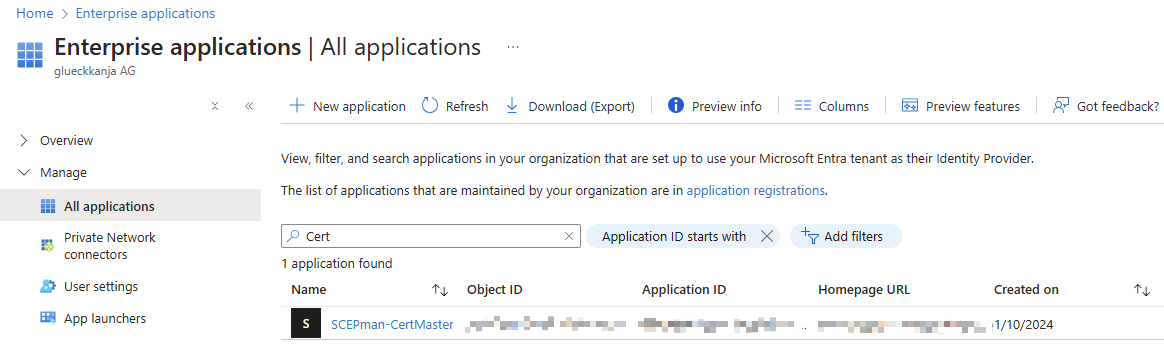
### SCEPman-CertMaster に移動
Azure > Enterprise Applications > フィルターをクリア > SCEPman-CertMaster
{% endstep %}
{% step %}
### ユーザー/グループを割り当て
Manage > ユーザーとグループ に移動し、希望する管理者とそのロールを選択します。\
管理者とロールを選択したら、\[割り当て] を押します。\

{% endstep %}
{% step %}
### Web ブラウザーのキャッシュをクリアする(任意)
場合によっては、管理者の権限が変更された後でも、表示上は同じに見えることがあります。この問題を回避するには、Certificate Master の Cookie をすべて削除してください。
{% endstep %}
{% endstepper %}
---
# Agent Instructions
This documentation is published with GitBook. GitBook is the documentation platform designed so that both humans and AI agents can read, navigate, and reason over technical content effectively. Learn more at gitbook.com.
## Querying This Documentation
If you need additional information that is not directly available in this page, you can query the documentation by asking a question.
Perform an HTTP GET request on the following URL with the `ask` and `goal` query parameters:
```
GET https://docs.scepman.com/ja/scepman-gou-cheng/rbac.md?ask=&goal=
```
`ask` is the immediate question: it should be specific, self-contained, and written in natural language.
`goal` is what the user is ultimately trying to achieve, the reason they need the answer. Sharing it helps GitBook give you a better, more relevant answer. A goal is most helpful when it describes the outcome the user wants rather than restating the question. For example, with `ask=how do I create an API token`, a goal like `automate deployments from our CI pipeline` lets GitBook tailor the answer to that use case.
The response will contain a direct answer to the question and relevant excerpts and sources from the documentation.
Use this mechanism when the answer is not explicitly present in the current page, you need clarification or additional context, or you want to retrieve related documentation sections.