> For the complete documentation index, see [llms.txt](https://docs.scepman.com/llms.txt). Markdown versions of documentation pages are available by appending `.md` to page URLs; this page is available as [Markdown](https://docs.scepman.com/ja/scepman-gou-cheng/application-settings/certificates.md).
# 証明書
{% hint style="info" %}
これらの設定は SCEPman App Service にのみ適用し、Certificate Master には適用しないでください。以下を参照してください [SCEPman 設定](/ja/scepman-gou-cheng/application-settings.md).
{% endhint %}
## AppConfig:AddMicrosoftAADExtensions
*Linux: AppConfig\_\_AddMicrosoftAADExtensions*
**値:** *true* (既定) または *false*
**説明:** 証明書に拡張 1.2.840.113556.5.14(AAD Tenant ID)および 1.2.840.113556.1.5.284.2(AAD Device ID)を含めるべきですか?
## AppConfig:AddSidExtension
*Linux: AppConfig\_\_AddSidExtension*
{% hint style="info" %}
バージョン 2.5 以降に適用
{% endhint %}
**値:** *true* または *false* (既定)
**説明:** この設定は、証明書に拡張 1.3.6.1.4.1.311.25.2(ユーザーの Security Identifier(SID))を含められるかどうかを決定します。この拡張は、 [Certifried 攻撃を軽減できます](/ja/sono/troubleshooting/certifried.md) 証明書がオンプレミス AD ユーザー認証に使用される場合。
この設定を false にすると、SCEPman はこの拡張を含む証明書を決して発行しません。true にすると、SCEPman は次の 2 つの場合にこの拡張を含む証明書を発行する可能性があります:
1つ目は、Intune 経由でユーザー証明書を登録するときに、ユーザーの AAD オブジェクトが属性に SID を含む場合です *OnPremisesSecurityIdentifier*。ユーザーの AAD オブジェクトに SID が含まれていない場合、たとえばクラウド専用ユーザーである場合、SCEPman はこの拡張を含む証明書を発行しません。同じことが、 [static-aad エンドポイント](/ja/scepman-gou-cheng/application-settings/scep-endpoints/staticaad-validation.md).
2つ目は、他の SCEP エンドポイントを通じてユーザー証明書を登録し、CSR にすでにその拡張が含まれている場合です。例としては、Static SCEP エンドポイントと Certificate Master を通じた手動の証明書要求があります。
## AppConfig:ValidityPeriodDays
*Linux: AppConfig\_\_ValidityPeriodDays*
**値:** *整数*
**説明:**\
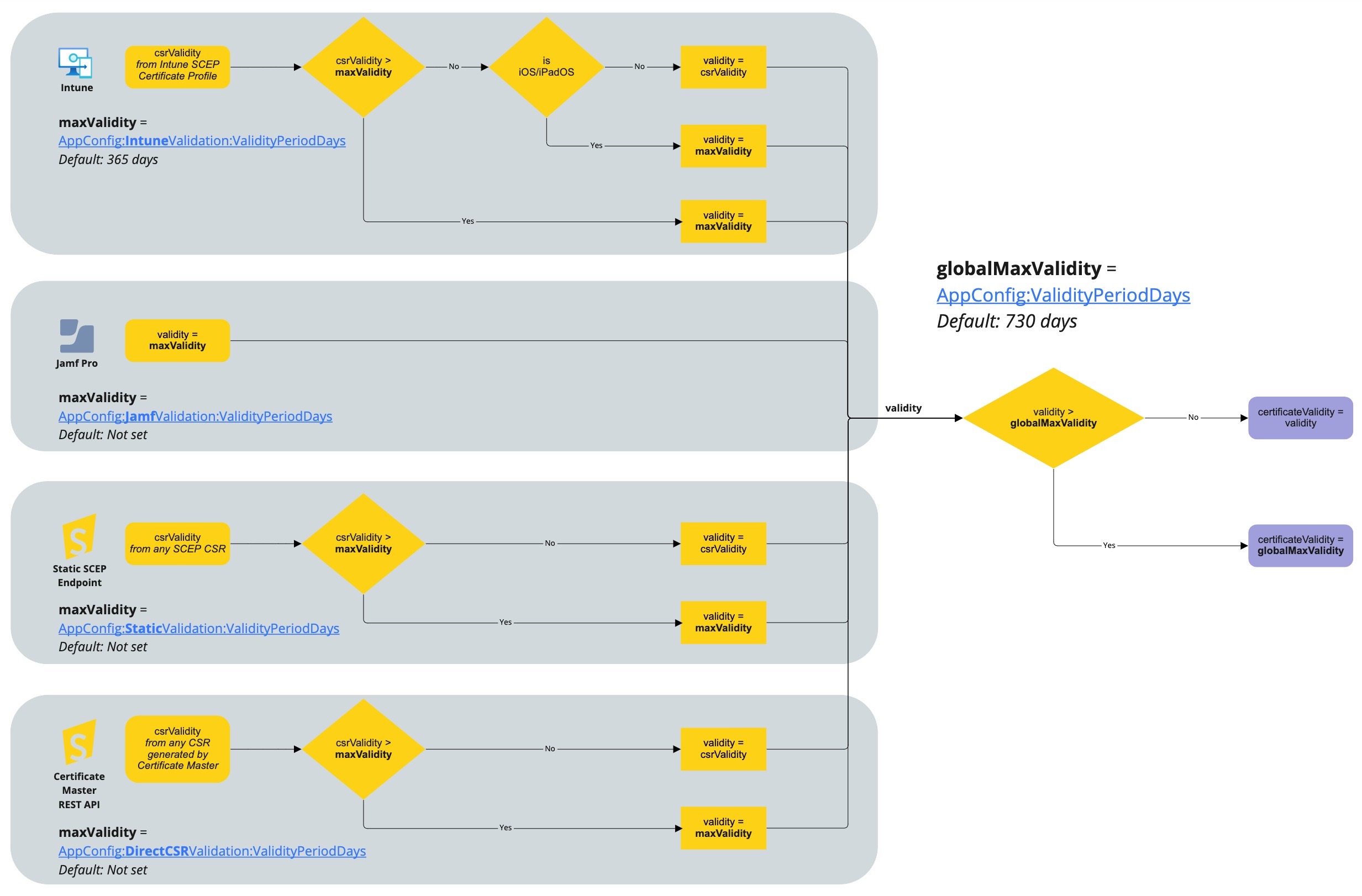
発行された証明書の有効期間の最大日数です。既定では、この設定は **730 日**。この設定が利用できない場合(古い SCEPman のインストールでは)、有効期間は **200 日**。SCEPman は、ここで定義された値より長い有効期間の証明書を決して発行しません。ただし、特定の証明書の有効期間を短くする方法はあります。
Intune の各 SCEP プロファイルで、次の手順に記載されているように、より短い有効期間を構成できます。 [Microsoft documentation](https://docs.microsoft.com/en-us/mem/intune/protect/certificates-scep-configure#modify-the-validity-period-of-the-certificate-template).
{% hint style="warning" %}
iOS/iPadOS および macOS デバイスは、Intune 経由の有効期間設定を無視します。そのため、iOS/iPadOS および macOS デバイスで 200 日以外の有効期間にしたい場合は、SCEPman でこの設定を構成する必要があります。詳細は [iOS/iPadOS](/ja/zheng-ming-shu-guan-li/microsoft-intune/ios.md) 詳細については、より高い値を推奨する箇所を参照してください。
{% endhint %}
次のことも構成できます。 **より短い** 有効期間。既定では、各エンドポイントに次の値が設定されています:
| エンドポイント | パラメーター | 有効期間(日数) |
| ------------------ | ----------------------------------------------------------------------------------------------------------------------------------------------------------------------------- | ------------ |
| Intune | [AppConfig:IntuneValidation:ValidityPeriodDays](/ja/scepman-gou-cheng/application-settings/scep-endpoints/intune-validation.md#appconfig-intunevalidation-validityperioddays) | 365 |
| Jamf | <未設定> | 730(グローバル設定) |
| Static | <未設定> | 730(グローバル設定) |
| Certificate Master | <未設定> | 730(グローバル設定) |
下の画像は、SCEPman が証明書の有効期間をどのように制限するかを示しています。まずエンドポイントごとのレベルで、その後にグローバルに制限します。
## AppConfig:ConcurrentSCEPRequestLimit
*Linux: AppConfig\_\_ConcurrentSCEPRequestLimit*
**値:** 正の *整数*
**デフォルト:** 50
**説明:** SCEPman に届く SCEP 要求が増えるほど、各要求の完了に時間がかかります。要求頻度が高い場合、たとえば多数のデバイスに SCEP 構成プロファイルを割り当てた直後などは、要求の処理に非常に時間がかかり、タイムアウトすることがあります。クライアントは失敗した要求を再試行するため、要求頻度が危険な過負荷レベルを超えたままになる可能性があります。
この設定により、SCEPman はこの数の SCEP 要求のみを並列で処理します。それより多くの要求がある場合、SCEPman は HTTP 329(Too Many Requests)を返します。この場合、Intune ベースのクライアントは後で証明書発行を再試行するため、通常は要求が失われることはありません。これにより、SCEPman は期限内に要求を完了でき、キューを処理する余裕が生まれます。
## AppConfig:ValidityClockSkewMinutes
*Linux: AppConfig\_\_ValidityClockSkewMinutes*
**値:** 正の *整数*
**デフォルト:** 1440
**説明:** SCEPman が証明書を発行すると、その有効期間は発行日時より 24 時間(1440 分)早く開始されます。これは、クライアントの時計が SCEPman より遅く進み、その結果、証明書はまだ有効ではないと判断する可能性があるためです。一部のプラットフォームでは、たとえ数秒後に有効になっても、無効な証明書を即座に破棄します。
## AppConfig:UseRequestedKeyUsages
*Linux: AppConfig\_\_UseRequestedKeyUsages*
**値:** *true* (既定) または *false*
**説明:** 証明書の Key Usage および Extended Key Usage(EKU)拡張を要求どおりに設定するべきですか、それとも SCEPman が定義するべきですか?
**True:** 証明書内の Key Usage および Extended Key Usage 拡張は、MDM ソリューションによって定義されます。\
**False:** Key Usage は常に *鍵暗号化* + *デジタル署名*。Extended Key Usage は常に *クライアント認証*.
{% hint style="warning" %}
iOS/iPadOS デバイスは、カスタマイズされた Extended Key Usage をサポートしていません(Intune プロファイルで構成されていても [#appconfig-userequestedkeyusages](#appconfig-userequestedkeyusages "mention") に設定 **True**)。そのため、それらの証明書には常に *クライアント認証* が Extended Key Usage として設定されます。
{% endhint %}
---
# Agent Instructions
This documentation is published with GitBook. GitBook is the documentation platform designed so that both humans and AI agents can read, navigate, and reason over technical content effectively. Learn more at gitbook.com.
## Querying This Documentation
If you need additional information that is not directly available in this page, you can query the documentation by asking a question.
Perform an HTTP GET request on the following URL with the `ask` and `goal` query parameters:
```
GET https://docs.scepman.com/ja/scepman-gou-cheng/application-settings/certificates.md?ask=&goal=
```
`ask` is the immediate question: it should be specific, self-contained, and written in natural language.
`goal` is what the user is ultimately trying to achieve, the reason they need the answer. Sharing it helps GitBook give you a better, more relevant answer. A goal is most helpful when it describes the outcome the user wants rather than restating the question. For example, with `ask=how do I create an API token`, a goal like `automate deployments from our CI pipeline` lets GitBook tailor the answer to that use case.
The response will contain a direct answer to the question and relevant excerpts and sources from the documentation.
Use this mechanism when the answer is not explicitly present in the current page, you need clarification or additional context, or you want to retrieve related documentation sections.