> For the complete documentation index, see [llms.txt](https://docs.scepman.com/llms.txt). Markdown versions of documentation pages are available by appending `.md` to page URLs; this page is available as [Markdown](https://docs.scepman.com/es/otro/faqs/key-vault-rbac-migration.md).
# Migración de RBAC de Key Vault
Microsoft está trasladando Azure Key Vault hacia Azure RBAC como el modelo de control de acceso predeterminado para todos los nuevos Key Vaults a partir de la versión de API **2026‑02‑01**. Leer más [aquí](https://learn.microsoft.com/en-us/azure/key-vault/general/access-control-default?tabs=azure-cli).
Aunque RBAC no es estrictamente obligatorio y **los Key Vaults existentes que usan directivas de acceso pueden seguir funcionando tal como están,** los inquilinos que creen un nuevo Key Vault después de actualizar a la nueva API obtendrán RBAC de forma predeterminada, a menos que las directivas de acceso se configuren explícitamente.
Puede ser una buena idea migrar a RBAC de todos modos, ya que proporciona un modelo de permisos más unificado y escalable, alineado con Microsoft Entra ID, y deja tu configuración preparada para el futuro en caso de que Microsoft deprecie las directivas de acceso de Key Vault.
## Guía de migración
{% hint style="warning" %}
Ten en cuenta el tiempo de inactividad antes de continuar. SCEPman no podrá emitir ni verificar certificados hasta que los permisos se hayan migrado correctamente.
{% endhint %}
{% stepper %}
{% step %}
### Ve a tu Key Vault de SCEPman
Ve a Azure > Key Vaults > *Tu Key Vault de SCEPman*
{% endstep %}
{% step %}
### Revisa tus directivas de acceso existentes
Navega a **directivas de acceso** y documenta las directivas de acceso de tu SCEPman en **Aplicación***.* Las directivas de acceso de SCEPman deben compartir el mismo nombre que tu App Service de SCEPman (y cualquier App Service de SCEPman con redundancia geográfica).
*Usuario* las directivas de acceso no necesitan migrarse, ya que no afectarán la funcionalidad de SCEPman. Los usuarios que requieran acceso continuo deben tener sus directivas de acceso revisadas y migradas a roles de Azure según la siguiente tabla:
{% endstep %}
{% step %}
### Cambiar el modelo de permisos
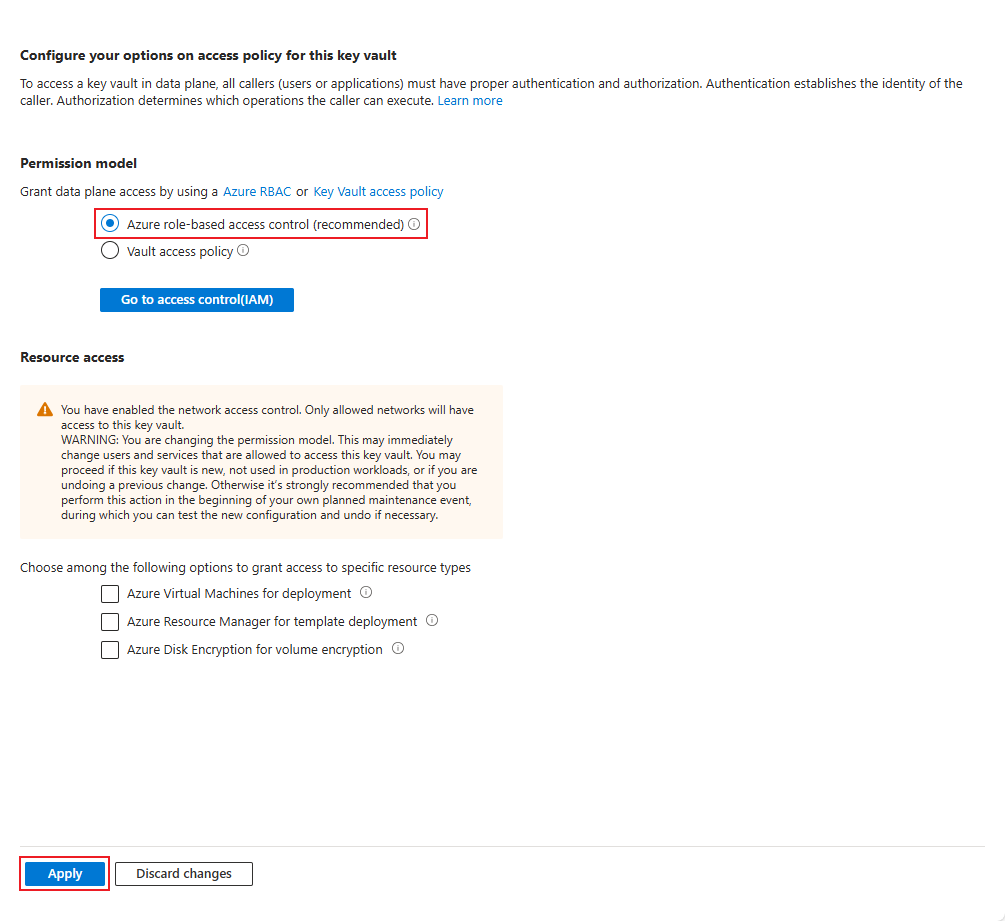
Cambia el modelo de permisos de **directiva de acceso del Key Vault** para **control de acceso basado en roles de Azure**
Al pulsar **Aplicar** desconectará tu instancia de SCEPman de Key Vault hasta que se asignen roles de Azure. También se eliminarán las directivas de acceso anteriores.
{% endstep %}
{% step %}
### Asignar roles de Azure
Ve a Control de acceso (IAM) y asigna los siguientes roles a la **identidad administrada** de tu App Service de SCEPman (y cualquier App Service de SCEPman con redundancia geográfica):
* Oficial de certificados de Key Vault
* Oficial de criptografía de Key Vault
* Usuario de secretos de Key Vault
Los roles deben asignarse uno a la vez; sin embargo, se pueden asignar varias identidades a un solo rol.
La identidad administrada del Certificate Master (con -cm en su nombre) **no** requieren acceso a Key Vault.
{% endstep %}
{% step %}
### Comprueba la conectividad con Key Vault
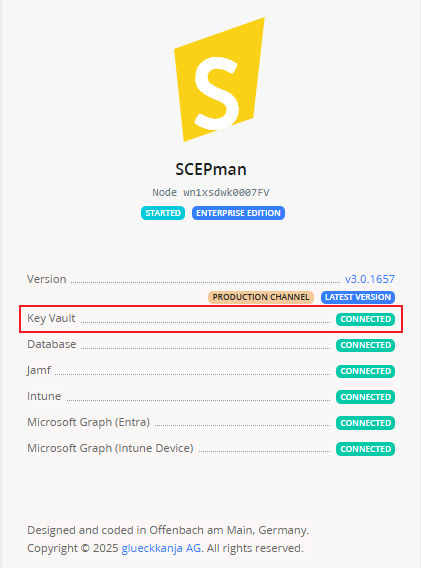
Reinicia tu App Service de SCEPman y luego ve a la página de inicio de SCEPman y asegúrate de que tu Key Vault esté conectado.
{% endstep %}
{% endstepper %}
---
# Agent Instructions
This documentation is published with GitBook. GitBook is the documentation platform designed so that both humans and AI agents can read, navigate, and reason over technical content effectively. Learn more at gitbook.com.
## Querying This Documentation
If you need additional information that is not directly available in this page, you can query the documentation dynamically by asking a question.
Perform an HTTP GET request on the current page URL with the `ask` query parameter, and the optional `goal` query parameter:
```
GET https://docs.scepman.com/es/otro/faqs/key-vault-rbac-migration.md?ask=&goal=
```
`ask` is the immediate question: it should be specific, self-contained, and written in natural language.
`goal` is optional and describes the broader end goal you are ultimately trying to accomplish on behalf of the user. GitBook uses it to tailor the answer towards what is most useful for that goal.
The response will contain a direct answer to the question and relevant excerpts and sources from the documentation.
Use this mechanism when the answer is not explicitly present in the current page, you need clarification or additional context, or you want to retrieve related documentation sections.