> For the complete documentation index, see [llms.txt](https://docs.scepman.com/llms.txt). Markdown versions of documentation pages are available by appending `.md` to page URLs; this page is available as [Markdown](https://docs.scepman.com/es/gestion-de-certificados/manage-certificates/enabling-crl.md).

# Habilitar CRL

Una lista de revocación de certificados (CRL) es un registro que contiene certificados que han sido revocados explícitamente.

{% hint style="danger" %}
Debes **NO** habilitar CRL para SCEPman. De forma predeterminada, SCEPman usa OCSP para la revocación.
{% endhint %}

SCEPman se basa principalmente en OCSP para comprobar el estado de revocación de un certificado, ya que OCSP permite la revocación en tiempo real, lo que lo convierte en el protocolo ideal para entornos de trabajo dinámicos. En cambio, CRL funciona con actualizaciones programadas, lo que limita su eficacia en escenarios sensibles al tiempo.

Sin embargo, CRL sigue siendo útil para sistemas heredados y aplicaciones o como alternativa cuando OCSP no está disponible.

{% hint style="warning" %}
La CRL no contendrá certificados que hayan sido revocados automáticamente, solo certificados que hayan sido revocados explícitamente en el Certificate Master
{% endhint %}

## Guía

{% stepper %}
{% step %}

### Vaya a sus Variables de entorno

Azure > App Services > SCEPman App Service (no Certificate Master) > Configuración > Variables de entorno

<figure><img src="https://4115997120-files.gitbook.io/~/files/v0/b/gitbook-x-prod.appspot.com/o/spaces%2F-LoGejQeUQcw7lqnQ3WX%2Fuploads%2FBUKjjEZjaMW4aB9PW8Ck%2Fimage.png?alt=media&amp;token=ebfbb935-66e8-471b-8e1b-81d2cc5bb221" alt=""><figcaption></figcaption></figure>
{% endstep %}

{% step %}

### Agregar Variables de entorno

Tenga en cuenta que los planes de App Service de Linux usan un doble guion bajo (\_\_) en lugar de dos puntos (:). Por ejemplo: AppConfig\_\_CRL\_\_RequestToken

<table><thead><tr><th width="247">Configuración</th><th width="291">Descripción</th><th>Valor</th></tr></thead><tbody><tr><td><a href="/es/configuracion-de-scepman/application-settings/crl.md#appconfig-crl-requesttoken">AppConfig:CRL:RequestToken</a></td><td><p>Define la URL de la CRL. La CRL está disponible tanto en DER como en PEM</p><p><br><strong>DER</strong>: https://<em>yourscepman</em>.azurewebsites.net/crl/<strong>{RequestToken}</strong></p><p><strong>PEM:</strong> https://yourscepman.azurewebsites.net/crl/pem/<strong>{RequestToken}</strong><br><br>Ejemplo: https://<em>yourscepman</em>.azurewebsites.net/crl/12345678</p></td><td>24 caracteres <em>cadena</em></td></tr><tr><td><a href="/es/configuracion-de-scepman/application-settings/crl.md#appconfig-crl-source">AppConfig:CRL:Source</a></td><td>Conecta la CRL a su Azure Storage Account</td><td>Almacenamiento</td></tr><tr><td><a href="/es/configuracion-de-scepman/application-settings/crl.md#appconfig-crl-addcdp">AppConfig:CRL:AddCdp</a></td><td>Agrega un punto de distribución de CRL a los certificados emitidos</td><td>true</td></tr><tr><td><a href="/es/configuracion-de-scepman/application-settings/crl.md#appconfig-crl-validitydays">AppConfig:CRL:ValidityDays</a></td><td>El número de días durante los cuales una CRL emitida es válida</td><td><em>Punto flotante</em><br>Ejemplo <em>0.1</em> días = 2,4 horas</td></tr></tbody></table>

<figure><img src="https://4115997120-files.gitbook.io/~/files/v0/b/gitbook-x-prod.appspot.com/o/spaces%2F-LoGejQeUQcw7lqnQ3WX%2Fuploads%2Fh6CT186Onlo0Jcbpj2X6%2Fimage.png?alt=media&amp;token=99d58cb5-f431-40f8-928b-14a95611450f" alt=""><figcaption></figcaption></figure>
{% endstep %}

{% step %}

### Aplicar Variables de entorno

Pulse Aplicar después de haber agregado las Variables de entorno.

<figure><img src="https://4115997120-files.gitbook.io/~/files/v0/b/gitbook-x-prod.appspot.com/o/spaces%2F-LoGejQeUQcw7lqnQ3WX%2Fuploads%2FQKJWhPGTRLL3LyefIY00%2Fimage.png?alt=media&amp;token=bbcefc38-36be-4a9b-8359-f4bd3418b431" alt=""><figcaption></figcaption></figure>

<figure><img src="https://4115997120-files.gitbook.io/~/files/v0/b/gitbook-x-prod.appspot.com/o/spaces%2F-LoGejQeUQcw7lqnQ3WX%2Fuploads%2FuPk2gy1bwiosVnRiDhrv%2Fimage.png?alt=media&amp;token=ed75ae50-5cab-454e-924f-904c94e9e232" alt=""><figcaption></figcaption></figure>
{% endstep %}

{% step %}

### Reiniciar SCEPman App Service

Las nuevas Variables de entorno se aplican después de reiniciar el SCEPman App Service

<figure><img src="https://4115997120-files.gitbook.io/~/files/v0/b/gitbook-x-prod.appspot.com/o/spaces%2F-LoGejQeUQcw7lqnQ3WX%2Fuploads%2FULK6GxJy09kLxYQ1AbXy%2Fimage.png?alt=media&amp;token=72cfbd74-049e-483e-892e-4b5dac1a2434" alt=""><figcaption></figcaption></figure>
{% endstep %}

{% step %}

### Probar la CRL

Vaya a su CRL usando el Request Token configurado previamente en el formato https\://*yourscepman*.azurewebsites.net/crl/**{RequestToken}**

<figure><img src="https://4115997120-files.gitbook.io/~/files/v0/b/gitbook-x-prod.appspot.com/o/spaces%2F-LoGejQeUQcw7lqnQ3WX%2Fuploads%2FtADhHMEFdwU32z7e1hsM%2Fimage.png?alt=media&amp;token=ad633ca6-9696-44c5-8272-17b3f97996be" alt=""><figcaption></figcaption></figure>

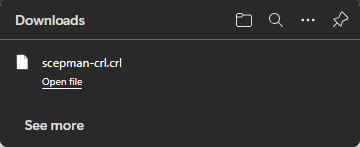
Si está configurado correctamente, se descargará su CRL:

<figure><img src="https://4115997120-files.gitbook.io/~/files/v0/b/gitbook-x-prod.appspot.com/o/spaces%2F-LoGejQeUQcw7lqnQ3WX%2Fuploads%2FvVbjNdIPjCdoKyIP6T6G%2Fimage.png?alt=media&amp;token=9351e8d9-6dfb-4a16-b8c4-4edfd80f2b77" alt=""><figcaption></figcaption></figure>
{% endstep %}

{% step %}

### Usar CRL con aplicaciones o sistemas

Una vez habilitada, asegúrese de que sus aplicaciones o sistemas estén configurados para comprobar la CRL durante la validación del certificado para evitar el uso de certificados revocados. Algunos sistemas permiten CRL como opción alternativa en caso de que OCSP no esté disponible

Otros sistemas **solo** permiten CRL para la revocación, como CBA para Entra, consulte nuestra guía aquí:

{% content-ref url="/pages/33b4b823c06221540c503ceecceead388093c2c8" %}
[Autenticación basada en certificados para Entra ID](/es/despliegue-de-scepman/deployment-guides/scenarios/certificate-based-authentication-for-entra-id.md)
{% endcontent-ref %}
{% endstep %}
{% endstepper %}


---

# Agent Instructions
This documentation is published with GitBook. GitBook is the documentation platform designed so that both humans and AI agents can read, navigate, and reason over technical content effectively. Learn more at gitbook.com.

## Querying This Documentation
If you need additional information that is not directly available in this page, you can query the documentation dynamically by asking a question.

Perform an HTTP GET request on the current page URL with the `ask` query parameter, and the optional `goal` query parameter:

```
GET https://docs.scepman.com/es/gestion-de-certificados/manage-certificates/enabling-crl.md?ask=<question>&goal=<endgoal>
```

`ask` is the immediate question: it should be specific, self-contained, and written in natural language.
`goal` is optional and describes the broader end goal you are ultimately trying to accomplish on behalf of the user. GitBook uses it to tailor the answer towards what is most useful for that goal.

The response will contain a direct answer to the question and relevant excerpts and sources from the documentation.

Use this mechanism when the answer is not explicitly present in the current page, you need clarification or additional context, or you want to retrieve related documentation sections.