> For the complete documentation index, see [llms.txt](https://docs.scepman.com/llms.txt). Markdown versions of documentation pages are available by appending `.md` to page URLs; this page is available as [Markdown](https://docs.scepman.com/de/zertifikatsverwaltung/manage-certificates/enabling-crl.md).

# CRL aktivieren

Eine Certificate Revocation List (CRL) ist eine Aufzeichnung, die Zertifikate enthält, die ausdrücklich widerrufen wurden.

{% hint style="danger" %}
Das müssen Sie **NICHT** CRL für SCEPman aktivieren. Standardmäßig verwendet SCEPman OCSP für den Widerruf.
{% endhint %}

SCEPman verlässt sich in erster Linie auf OCSP, um den Widerrufsstatus von Zertifikaten zu prüfen, da OCSP den Widerruf in Echtzeit ermöglicht und damit das ideale Protokoll für dynamische Arbeitsumgebungen ist. Im Gegensatz dazu arbeitet CRL mit geplanten Aktualisierungen, was seine Wirksamkeit in zeitkritischen Szenarien einschränkt.

CRL ist jedoch weiterhin für Legacy-Systeme und Anwendungen nützlich oder als Fallback, wenn OCSP nicht verfügbar ist.

{% hint style="warning" %}
Die CRL enthält keine Zertifikate, die automatisch widerrufen wurden, sondern nur Zertifikate, die im Certificate Master ausdrücklich widerrufen wurden
{% endhint %}

## Anleitung

{% stepper %}
{% step %}

### Navigieren Sie zu Ihren Umgebungsvariablen

Azure > App Services > SCEPman App Service (nicht Certificate Master) > Einstellungen > Umgebungsvariablen

<figure><img src="https://2075553437-files.gitbook.io/~/files/v0/b/gitbook-x-prod.appspot.com/o/spaces%2F-LoGejQeUQcw7lqnQ3WX%2Fuploads%2FBUKjjEZjaMW4aB9PW8Ck%2Fimage.png?alt=media&amp;token=ebfbb935-66e8-471b-8e1b-81d2cc5bb221" alt=""><figcaption></figcaption></figure>
{% endstep %}

{% step %}

### Umgebungsvariablen hinzufügen

Bitte beachten Sie, dass Linux App Service-Pläne einen doppelten Unterstrich (\_\_) anstelle eines Doppelpunkts (:) verwenden. Beispiel: AppConfig\_\_CRL\_\_RequestToken

<table><thead><tr><th width="247">Einstellung</th><th width="291">Beschreibung</th><th>Wert</th></tr></thead><tbody><tr><td><a href="/de/scepman-konfiguration/application-settings/crl.md#appconfig-crl-requesttoken">AppConfig:CRL:RequestToken</a></td><td><p>Definiert die URL der CRL. Die CRL ist sowohl als DER als auch als PEM verfügbar</p><p><br><strong>DER</strong>: https://<em>yourscepman</em>.azurewebsites.net/crl/<strong>{RequestToken}</strong></p><p><strong>PEM:</strong> https://yourscepman.azurewebsites.net/crl/pem/<strong>{RequestToken}</strong><br><br>Beispiel: https://<em>yourscepman</em>.azurewebsites.net/crl/12345678</p></td><td>24-stellige <em>Zeichenfolge</em></td></tr><tr><td><a href="/de/scepman-konfiguration/application-settings/crl.md#appconfig-crl-source">AppConfig:CRL:Source</a></td><td>Verbindet die CRL mit Ihrem Azure Storage Account</td><td>Speicher</td></tr><tr><td><a href="/de/scepman-konfiguration/application-settings/crl.md#appconfig-crl-addcdp">AppConfig:CRL:AddCdp</a></td><td>Fügt ausgestellten Zertifikaten einen CRL-Verteilungspunkt hinzu</td><td>true</td></tr><tr><td><a href="/de/scepman-konfiguration/application-settings/crl.md#appconfig-crl-validitydays">AppConfig:CRL:ValidityDays</a></td><td>Die Anzahl der Tage, für die eine ausgestellte CRL gültig ist</td><td><em>Fließkommazahl</em><br>Beispiel <em>0.1</em> Tage = 2,4 Stunden</td></tr></tbody></table>

<figure><img src="https://2075553437-files.gitbook.io/~/files/v0/b/gitbook-x-prod.appspot.com/o/spaces%2F-LoGejQeUQcw7lqnQ3WX%2Fuploads%2Fh6CT186Onlo0Jcbpj2X6%2Fimage.png?alt=media&amp;token=99d58cb5-f431-40f8-928b-14a95611450f" alt=""><figcaption></figcaption></figure>
{% endstep %}

{% step %}

### Umgebungsvariablen anwenden

Klicken Sie auf Anwenden, nachdem die Umgebungsvariablen hinzugefügt wurden.

<figure><img src="https://2075553437-files.gitbook.io/~/files/v0/b/gitbook-x-prod.appspot.com/o/spaces%2F-LoGejQeUQcw7lqnQ3WX%2Fuploads%2FQKJWhPGTRLL3LyefIY00%2Fimage.png?alt=media&amp;token=bbcefc38-36be-4a9b-8359-f4bd3418b431" alt=""><figcaption></figcaption></figure>

<figure><img src="https://2075553437-files.gitbook.io/~/files/v0/b/gitbook-x-prod.appspot.com/o/spaces%2F-LoGejQeUQcw7lqnQ3WX%2Fuploads%2FuPk2gy1bwiosVnRiDhrv%2Fimage.png?alt=media&amp;token=ed75ae50-5cab-454e-924f-904c94e9e232" alt=""><figcaption></figcaption></figure>
{% endstep %}

{% step %}

### SCEPman App Service neu starten

Neue Umgebungsvariablen werden angewendet, nachdem der SCEPman App Service neu gestartet wurde

<figure><img src="https://2075553437-files.gitbook.io/~/files/v0/b/gitbook-x-prod.appspot.com/o/spaces%2F-LoGejQeUQcw7lqnQ3WX%2Fuploads%2FULK6GxJy09kLxYQ1AbXy%2Fimage.png?alt=media&amp;token=72cfbd74-049e-483e-892e-4b5dac1a2434" alt=""><figcaption></figcaption></figure>
{% endstep %}

{% step %}

### CRL testen

Rufen Sie Ihre CRL mit dem zuvor festgelegten Request Token im Format https\:// auf*yourscepman*.azurewebsites.net/crl/**{RequestToken}**

<figure><img src="https://2075553437-files.gitbook.io/~/files/v0/b/gitbook-x-prod.appspot.com/o/spaces%2F-LoGejQeUQcw7lqnQ3WX%2Fuploads%2FtADhHMEFdwU32z7e1hsM%2Fimage.png?alt=media&amp;token=ad633ca6-9696-44c5-8272-17b3f97996be" alt=""><figcaption></figcaption></figure>

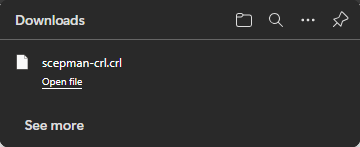
Wenn alles korrekt eingerichtet ist, wird Ihre CRL heruntergeladen:

<figure><img src="https://2075553437-files.gitbook.io/~/files/v0/b/gitbook-x-prod.appspot.com/o/spaces%2F-LoGejQeUQcw7lqnQ3WX%2Fuploads%2FvVbjNdIPjCdoKyIP6T6G%2Fimage.png?alt=media&amp;token=9351e8d9-6dfb-4a16-b8c4-4edfd80f2b77" alt=""><figcaption></figcaption></figure>
{% endstep %}

{% step %}

### CRL mit Anwendungen oder Systemen verwenden

Sobald aktiviert, stellen Sie sicher, dass Ihre Anwendungen oder Systeme so konfiguriert sind, dass sie die CRL während der Zertifikatsvalidierung prüfen, um die Verwendung widerrufener Zertifikate zu verhindern. Einige Systeme erlauben CRL als Fallback-Option, falls OCSP nicht verfügbar ist

Andere Systeme **nur** CRL für den Widerruf zulassen, wie z. B. CBA für Entra, finden Sie bitte hier unsere Anleitung:

{% content-ref url="/pages/ea75e4b10f2aa27a38f36a14d2d46124c00d792b" %}
[Zertifikatsbasierte Authentifizierung für Entra ID](/de/scepman-bereitstellung/deployment-guides/scenarios/certificate-based-authentication-for-entra-id.md)
{% endcontent-ref %}
{% endstep %}
{% endstepper %}


---

# Agent Instructions
This documentation is published with GitBook. GitBook is the documentation platform designed so that both humans and AI agents can read, navigate, and reason over technical content effectively. Learn more at gitbook.com.

## Querying This Documentation
If you need additional information that is not directly available in this page, you can query the documentation dynamically by asking a question.

Perform an HTTP GET request on the current page URL with the `ask` query parameter, and the optional `goal` query parameter:

```
GET https://docs.scepman.com/de/zertifikatsverwaltung/manage-certificates/enabling-crl.md?ask=<question>&goal=<endgoal>
```

`ask` is the immediate question: it should be specific, self-contained, and written in natural language.
`goal` is optional and describes the broader end goal you are ultimately trying to accomplish on behalf of the user. GitBook uses it to tailor the answer towards what is most useful for that goal.

The response will contain a direct answer to the question and relevant excerpts and sources from the documentation.

Use this mechanism when the answer is not explicitly present in the current page, you need clarification or additional context, or you want to retrieve related documentation sections.